PDFUtil
Downloads and support
Self-service guidance for installing and maintaining PDFUtil on Windows. Download the current stable build below, then verify the published SHA-256 checksum before running it.
Download and run
Download PDFUtil.exe for Windows x64 directly from this site. There is no installer: save the executable in a folder you want to keep using, then run it from there. The first time you run PDFUtil, you'll see Preferences where you can add shortcuts and assign PDFUtil to PDF files.
Microsoft Edge may ask you to Keep the download
Microsoft Defender SmartScreen often flags uncommon executables that are not Authenticode-signed. PDFUtil, Screenshot Capture, Notepad++ Clone and Environment Variable Configurator currently ship as unsigned bundles, so Edge may show a warning. Some Edge versions ask you to choose Keep. Some also ask for Keep anyway. That warning is a reputation and publisher check. It does not mean a Baker Utilities checksum failed. Keep the file only when you started the download from this site. A matching SHA-256 checksum confirms that the downloaded bytes match the published release. It does not itself prove publisher identity.
- After the download starts, open Downloads in Microsoft Edge.
- Open the menu for PDFUtil.exe and choose Keep only when you started the download from this site.
- If Edge shows a further SmartScreen prompt, open the Delete menu and choose Keep anyway.
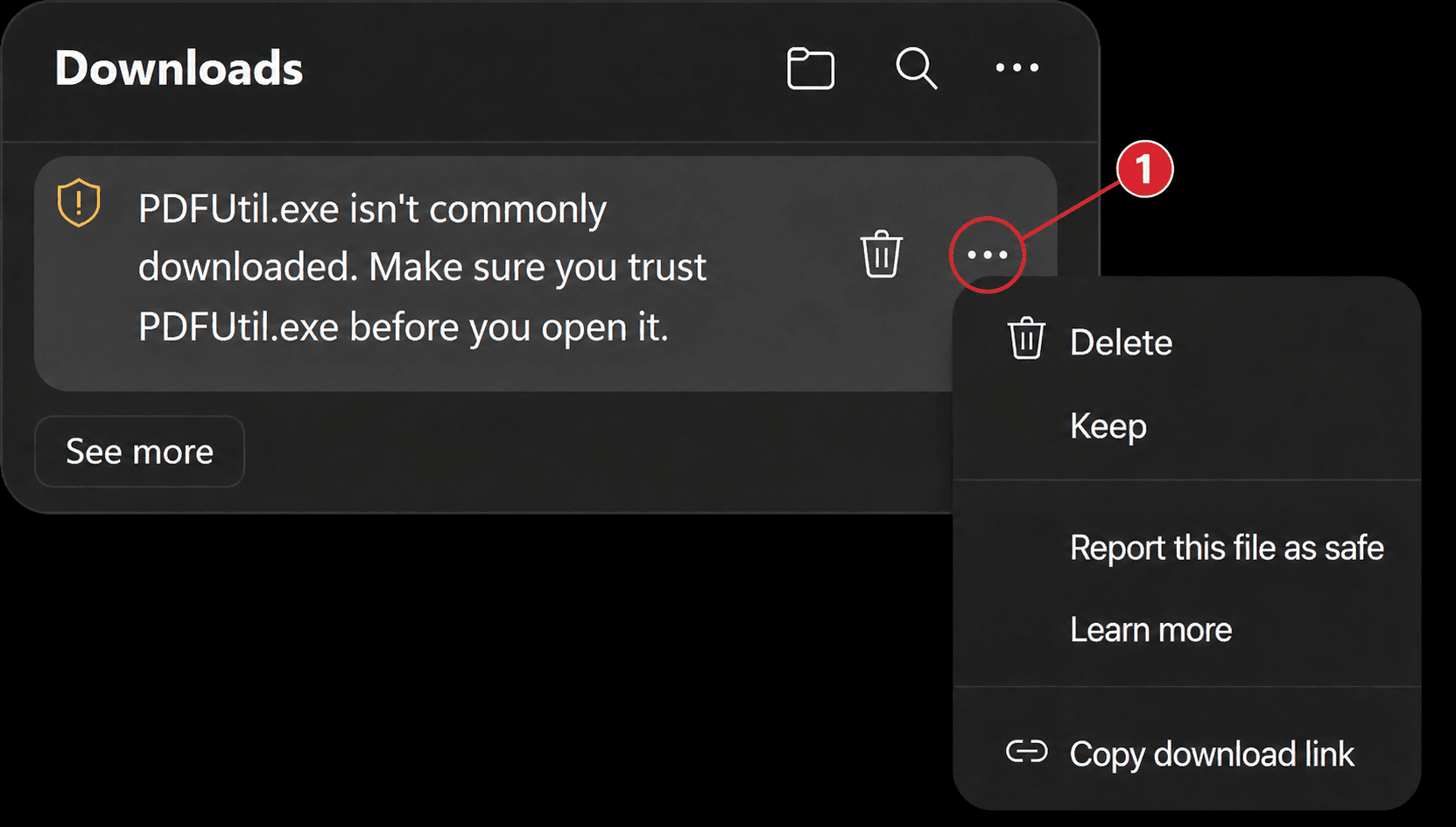
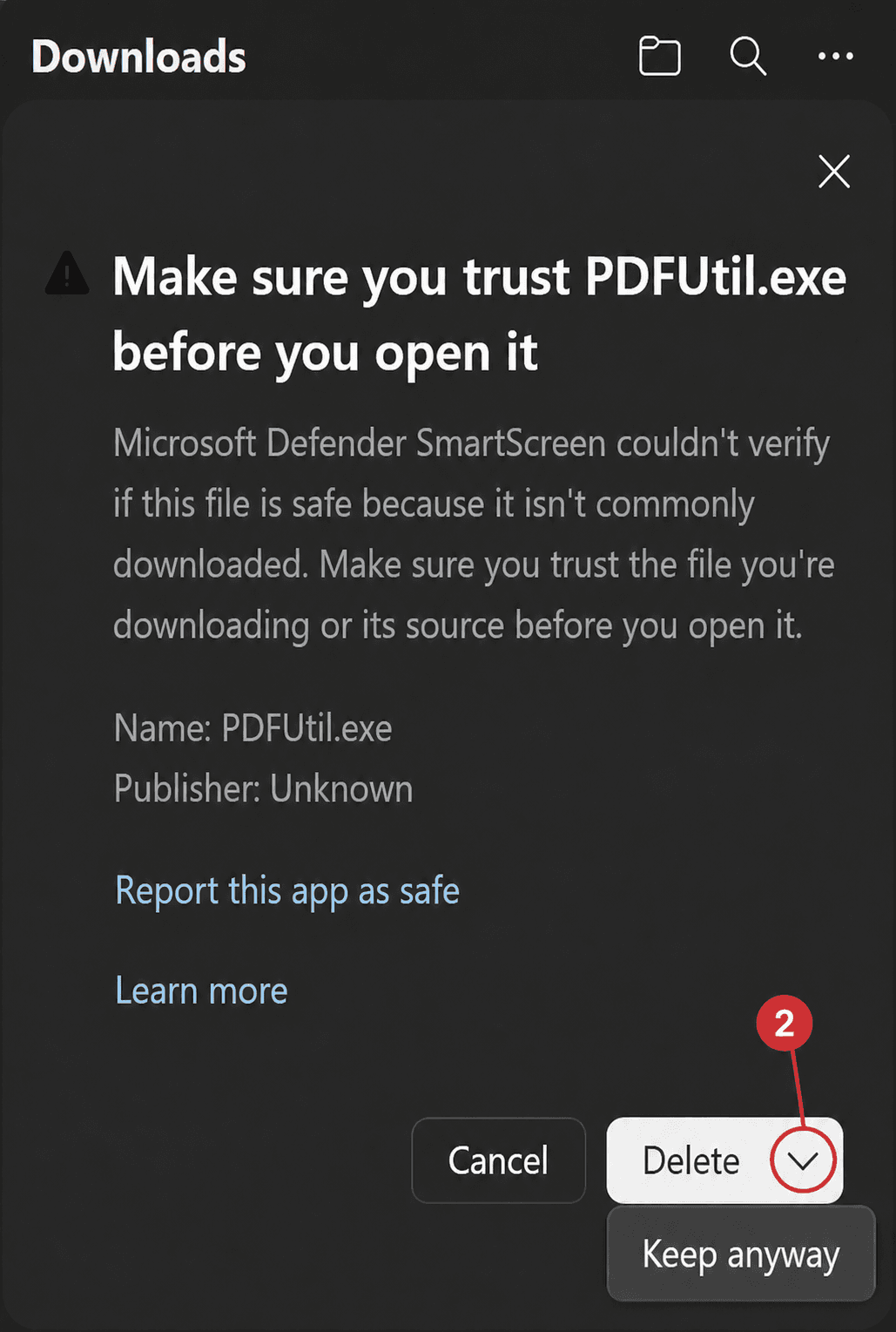
Some Edge versions finish the download after Keep. Some show a further Keep anyway prompt. Optional: verify the SHA-256 checksum before you run the file. Do not run it if the checksum does not match.
Verify the SHA-256 checksum (Optional)
A SHA-256 checksum is a fingerprint of the downloaded file. Use it to confirm that PDFUtil.exe matches the published release before you run it.
Show the hash only
Get-FileHash -Algorithm SHA256 .\PDFUtil.exeCompare against the published release
if ((Get-FileHash -Algorithm SHA256 .\PDFUtil.exe).Hash -eq '864142a06e9922bf28b27e27520e3957b6c00861772a01d5793e39d375515959') { 'Checksum matches' } else { 'Checksum does not match. Do not run this file.' }- Download PDFUtil.exe and the matching .sha256 file from this page, or copy the SHA-256 value shown under File details and checksum.
- Open PowerShell in the folder that contains the downloaded executable.
- Paste the compare command below. PowerShell reports whether the checksum matches.
- If the checksum does not match, do not run the file. Download it again from this site.
Updating
PDFUtil performs automatic in-app updates. It checks the signed stable update manifest, downloads the newer executable, and compares the SHA-256 hash with the published value. If the hash does not match, PDFUtil aborts the update and keeps your installed version.
Manual update
You can also update manually. Download the newer PDFUtil.exe from this site, compare the published SHA-256 checksum, then replace your previous executable with the new file.
Rollback
Keep the previous executable until you confirm the new version works for you. If a release is withdrawn, Baker Utilities will point the stable download back to the last known-good version and document the change on the release notes page.
Security
In-app updates verify the ECDSA-signed stable manifest and the SHA-256 hash before applying a new executable. If the hash does not match, the update is aborted. Current PDFUtil downloads are unsigned executables; verify the published checksum before you run a file from this site. Browser SmartScreen warnings for uncommon unsigned downloads are expected until Authenticode signing is available. The application pins its update trust keys independently of the website.
Related pages
Stable release PDFUtil 1.0.15
- Published
- 3 September 2026 (UTC)
Microsoft Edge may ask you to choose Keep. Some versions also ask for Keep anyway. That is expected for the current unsigned build. Why this happens and how to verify the download.
Release notes for 1.0.15Previous versionsFile details and checksum
Direct download from public object storage. Verify the SHA-256 checksum before running the executable.
- Version
- PDFUtil 1.0.15
- File size
- 64.9 MiB (68,100,739 bytes)
- SHA-256
- 864142a06e9922bf28b27e27520e3957b6c00861772a01d5793e39d375515959
Return to the PDFUtil product page.